
Few debates stir up the Linux community like the rivalry between GNOME and KDE Plasma. These are the two most popular desktop environments around, and for nearly three decades they have stood for two opposing ideas of how a free desktop should look and behave. There is no absolute winner here, just the choice that fits you best. This article breaks down their real differences so you can decide with confidence.
Two philosophies born almost side by side
History explains much of what sets them apart. KDE came first: Matthias Ettrich founded it on 14 October 1996, aiming to give Unix a consistent, pleasant desktop on top of the Qt toolkit. Barely a year later, in 1997, Miguel de Icaza and Federico Mena launched GNOME as an alternative built on the GTK toolkit, partly because of the licensing doubts that surrounded Qt at the time.
That technical heritage is still alive. KDE Plasma runs on Qt and GNOME on GTK, and many of their differences in design, integration and philosophy come straight from that choice.
GNOME: betting on opinionated simplicity
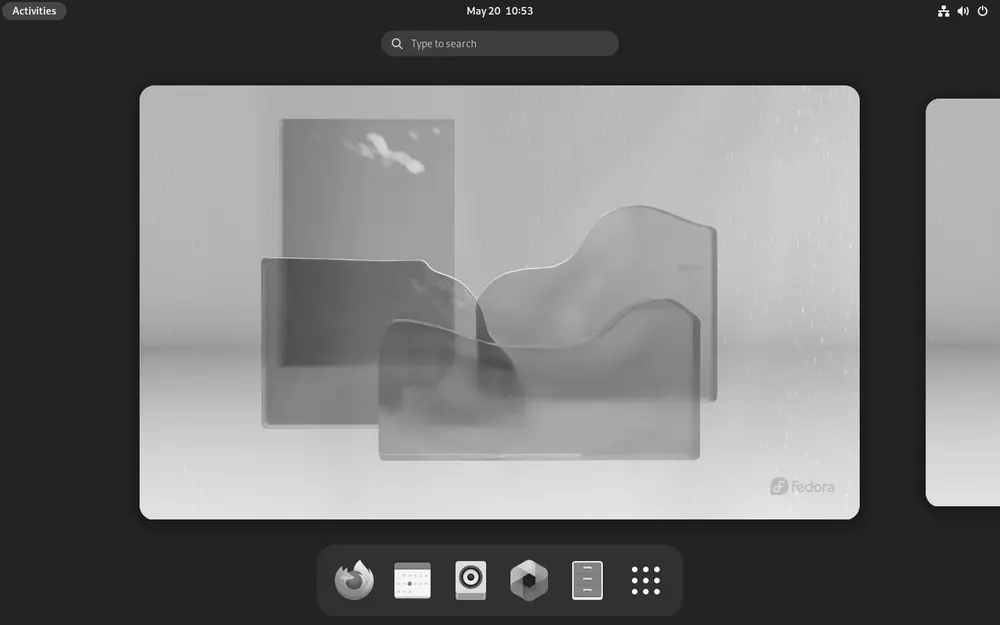
GNOME has leaned into a minimalist, opinionated model. Its interface, GNOME Shell, drops the classic desktop with icons and a taskbar in favor of an activities overview built around workflow, virtual workspaces and the keyboard.
GNOME’s thinking is plain: a coherent, polished experience out of the box, without burying you in options. That wins over anyone who just wants to open a laptop and get to work, and it frustrates anyone who misses settings that now live in extensions or in the separate “Tweaks” app.
GNOME is the default desktop on the most widely used distributions in the world. You will find it shipped by default in Fedora, in Ubuntu and in the standard edition of Debian. Its latest major release, GNOME 48 “Bengaluru”, arrived on 20 March 2025 with notable performance gains, notification stacking and initial HDR support.
KDE Plasma: flexibility without limits
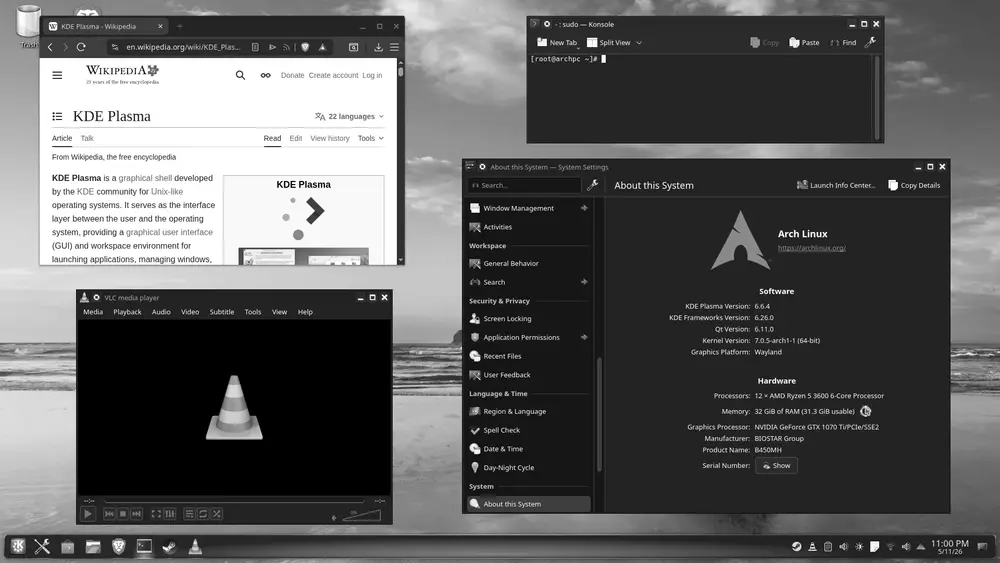
Where GNOME holds back, KDE Plasma throws the doors wide open. Almost every element is yours to change: panel position and behavior, widgets, window effects, shortcuts, themes, even how the window manager works under the hood. Anyone coming from Windows feels right at home thanks to its classic layout with a bottom panel and a start menu.
The Plasma 6 series, built on Qt 6 and KDE Frameworks 6, completed the move to Wayland. Plasma 6.3 shipped in February 2025, and the branch has kept advancing through releases such as 6.6 and 6.7 across 2025 and 2026, refining stability and performance.
Plasma is the flagship desktop of openSUSE and the headline option on distributions like Manjaro, KDE neon and Kubuntu. It is also a favorite among gaming-focused projects, which helps explain why you find it in environments such as SteamOS.
Performance and resource usage
For years the common wisdom held that KDE was heavy and GNOME light, but that no longer holds up. Plasma 6 has trimmed its footprint a lot and, in many cases, boots with memory usage similar to or even lower than GNOME Shell, which leans more on JavaScript and animations.
On modern hardware both run with room to spare. On very tight machines, neither is the best pick: that is where lighter environments shine, like those found in Lubuntu, Xubuntu or MX Linux. But if your hardware is reasonable, the choice between GNOME and KDE should come down to taste rather than memory figures.
Customization: extensions versus native settings
This is the most visible difference. GNOME hands advanced customization to extensions, third-party pieces that add features but can break when the desktop updates. KDE keeps almost everything native in its System Settings panel, which gives a sense of robustness and control that is hard to match.
If you enjoy fine-tuning every detail until it is perfect, Plasma is your playground. If you prefer a system that arrives already sorted out and you would rather not wrestle with menus, GNOME will give you peace of mind.
So which one should I choose?
There is no universal answer, but there are clear guidelines. Go with GNOME if you value simplicity, a modern coherent design, and a workflow centered on the keyboard and virtual workspaces. It fits well if you come from macOS or simply want a system that “just works.”
Go with KDE Plasma if you want to control everything, if you come from Windows and crave familiarity, or if you love shaping your desktop down to the last pixel. The best part of free software is that trying them costs nothing: many distributions offer both variants, and you can even install both and switch at login. The endless comparison, in the end, is one you settle for yourself simply by using them.