
The classic Unix permission model, the familiar rwx bits for owner, group and others, has guarded Linux systems for decades. It also has a structural weakness. It relies on the goodwill of whoever owns a file, and it does nothing to stop a process that is already running with privileges. If a compromised web server runs as root, traditional permissions will not prevent it from reading /etc/shadow or writing wherever it pleases. That gap is what Mandatory Access Control exists to close: the second security layer that ships built into modern distributions.
What Mandatory Access Control (MAC) really means
The usual Unix model is called Discretionary Access Control (DAC): “discretionary” because each user decides, at their own discretion, who may touch their files. Mandatory Access Control (MAC) turns that idea on its head. A system-wide policy defines what every process is allowed to do, and not even root can step outside it without first changing the policy itself.
The difference is profound. Under MAC, a process reaches only the resources the policy explicitly grants it. If an attacker hijacks a daemon, they stay trapped inside the rules that confine that specific daemon, no matter how much technical root power they hold. Confining every process to the bare minimum it needs is what underpins the two dominant MAC systems in the Linux world: SELinux and AppArmor.
SELinux: labels and policies born at the NSA
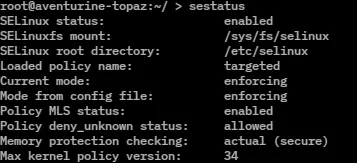
SELinux (Security-Enhanced Linux) originated at the United States National Security Agency (NSA), which released the first version as free software under the GPL on 22 December 2000. The code landed in the mainline Linux kernel with release 2.6.0-test3, in August 2003, built on top of the Linux Security Modules (LSM) framework.
Its approach revolves around labels. SELinux assigns a security context to every object on the system: files, processes, network ports, devices. The policy then dictates which labels may interact with which. It is an unusually fine-grained, powerful engine that can enforce Type Enforcement, Role-Based Access Control (RBAC) and Multi-Level Security (MLS). All that power buys it a reputation for a steep learning curve. When something breaks, it is almost always because a file is missing the correct label.
SELinux is enabled by default, in enforcing mode, on Fedora and Red Hat Enterprise Linux, and across the wider RHEL family: AlmaLinux, Rocky Linux and CentOS Stream. The standard targeted policy confines the most exposed daemons —web servers, databases, network services— while leaving user processes largely unrestricted. That strikes a sensible balance between security and usability.
AppArmor: paths instead of labels

AppArmor offers the same MAC protection with a different philosophy: instead of labelling every object, it defines profiles based on filesystem paths. A profile might state that /usr/sbin/nginx may read a certain directory, write to its logs and open specific ports, and nothing more. Because each profile is tied to a program by its path, profiles are far easier to read and write than a SELinux policy.
Its history reaches back to the late 1990s, when it was called SubDomain inside the Immunix distribution. Novell acquired the technology in 2005 and renamed it AppArmor; since kernel 2.6.36 it has been part of the mainline Linux kernel. Today it is the default MAC system on Ubuntu, Debian and openSUSE, and that simplicity is the reason. Creating or tuning a profile with tools such as aa-genprof is approachable even for administrators with no background in advanced security.
SELinux vs AppArmor: choosing the right trade-off
No outright winner here, just two distinct compromises. SELinux bets on the most exhaustive control possible: it labels the entire system and, when properly configured, delivers confinement that is very hard to escape, ideal for environments demanding strict certifications or high-assurance isolation. You pay for it in complexity and more laborious troubleshooting.
AppArmor gives up some of that granularity in exchange for clarity. Its readable, path-bound profiles can be understood at a glance and maintained with little effort. For many servers and workstations, that ratio of security to simplicity is exactly what is needed. So distributions pick one or the other to suit their audience: the Red Hat family prioritises rigour with SELinux, while Debian-derived systems favour the accessibility of AppArmor.
They coexist with the rest of system security
Keep in mind that MAC does not replace the other layers; it adds to them. SELinux and AppArmor work alongside classic permissions, kernel namespaces, cgroups and capabilities to reinforce the isolation of containers and services. Both meaningfully tighten technologies such as Docker and Podman, since they limit what a compromised container could do to its host.
The practical advice is simple: do not disable your distribution’s MAC. The temptation to set SELinux to permissive so it “stops getting in the way” makes sense when something fails, but it usually hides a labelling problem that has a fix. Learning to read audit logs and to adjust policies or profiles pays off many times over. When a single compromised service can take down an entire machine, Mandatory Access Control is one of the strongest defences Linux puts, free of charge, in your hands.